
Bringing In Your Source Material
Upload a transcript, report, script or set of images and set it up as the foundation of a project.
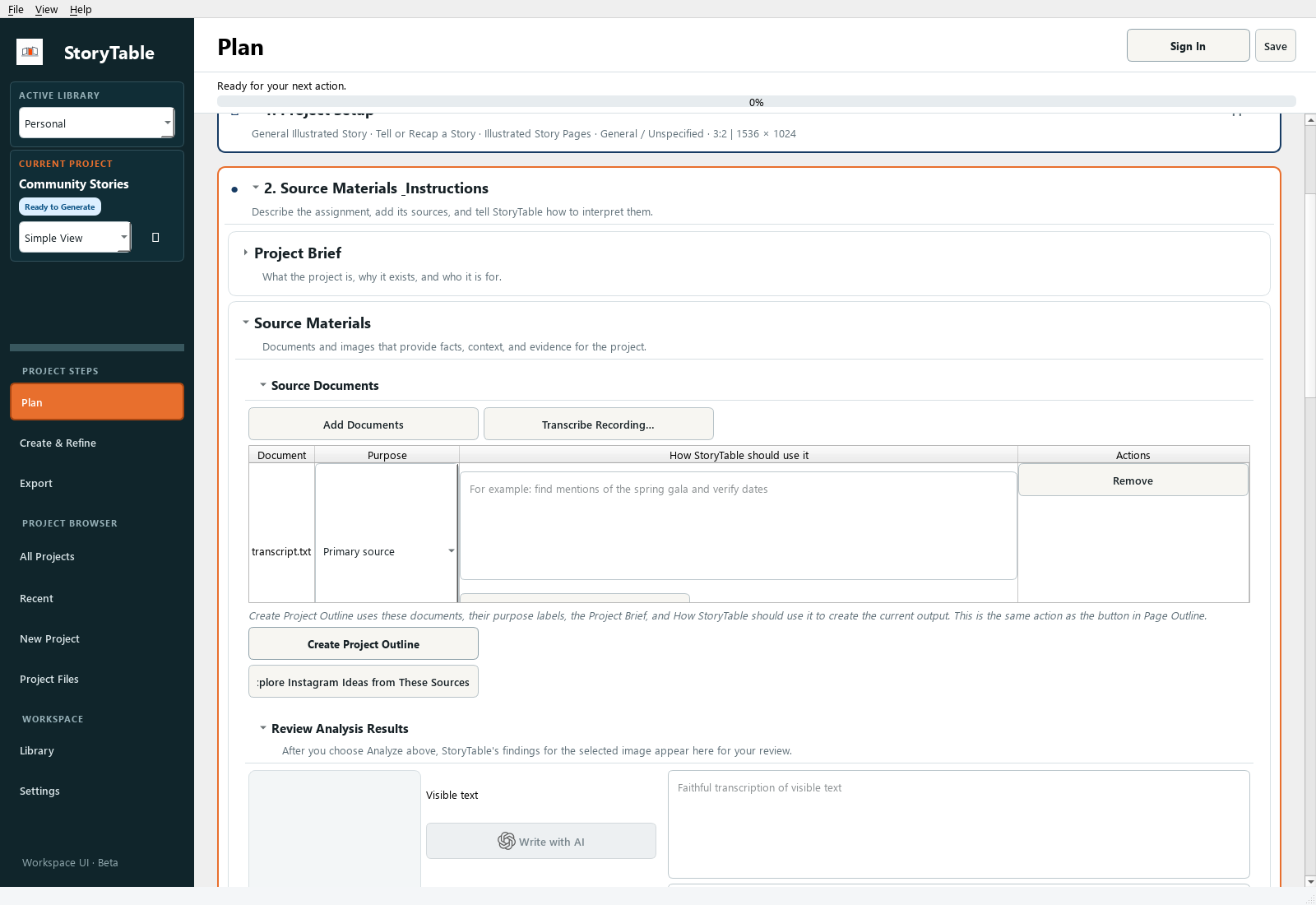
Give StoryTable the source material and instructions it needs before you ask it to plan or generate.
1. Open the source phase
Open your project, choose Plan, and expand Source Materials & Instructions. Open Source Materials and Source Documents.
2. Add a document or recording
Choose Add Documents to select a supported local file. For a recording, use Transcribe Recording… and review the resulting text. Start with one clear source rather than several overlapping versions.
3. Assign a purpose
Select the document and check its purpose. Use Primary source for the material the project should be based on; identify supporting material appropriately.
4. Explain how to use it
Fill in How StoryTable should use it. For example: ‘Use the interview as evidence. Keep names and dates unchanged. Organize the presentation around the three main themes.’
5. Create and review the outline
Choose Create Project Outline when the material and instructions are ready. Read the outline against the original source and correct missing context or unsupported claims before moving on.
Check your result
The project contains the intended source, its role is clear, and the outline reflects what the source actually says.