
Learn StoryTable, one function at a time
Getting Started
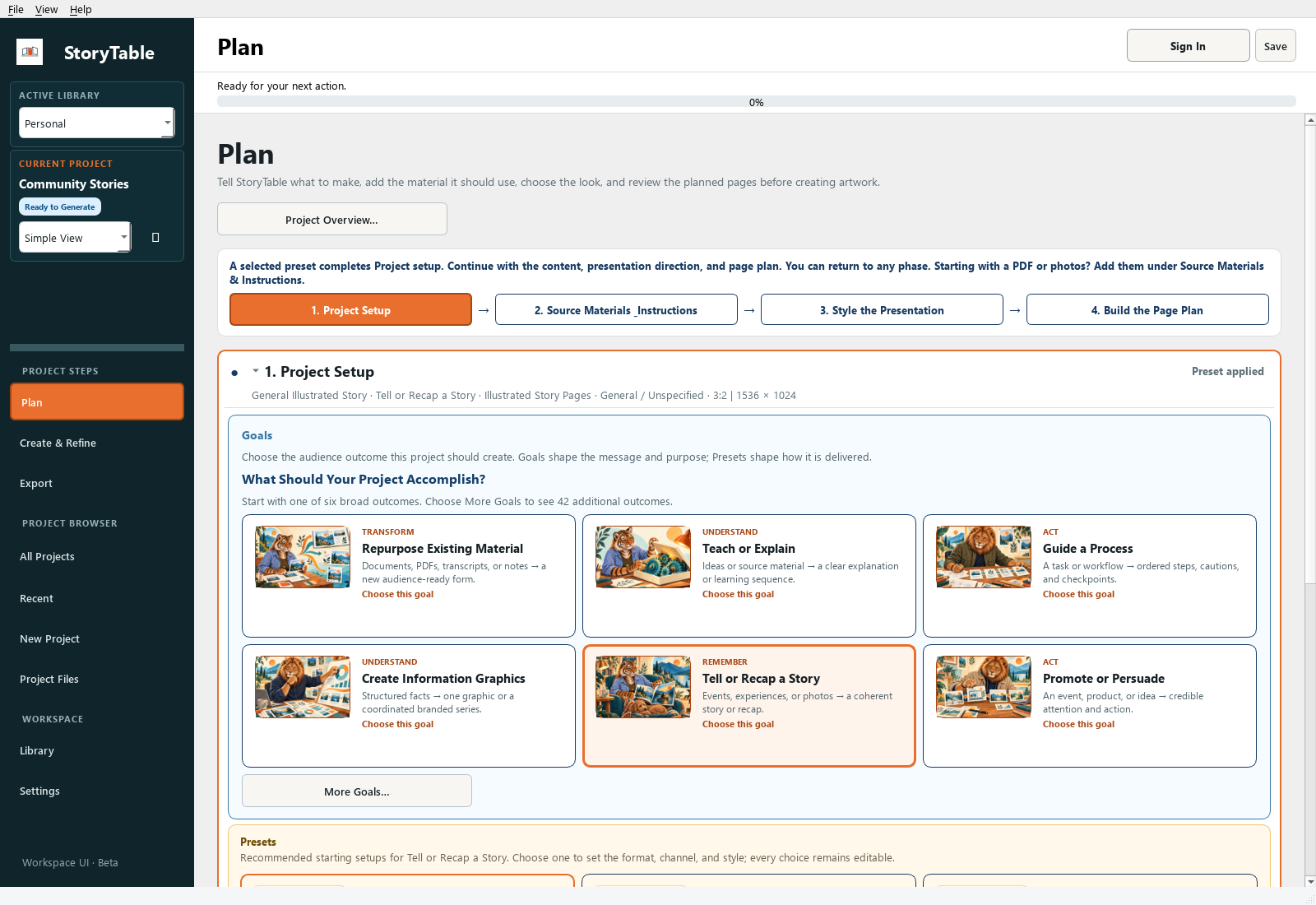
Build a small first project so you can learn the full workflow: Plan, Create & Refine, then Export.
1. Install and sign in
Use the Windows or Mac download in your beta access email, install StoryTable, and sign in with the password you set for your account.
2. Create a project
Create a new project and choose a name and a save location you can find again. Start with a short source document and a manageable output, such as a few presentation pages.
3. Set up the project
In Plan, open Project Setup. Choose the goal that matches your task, then apply a suitable preset. A preset gives you a starting combination of choices; review it before generating.
4. Add your material
Open Source Materials & Instructions. Add your source document and explain what the finished work should accomplish. Check that the right document is marked as the primary source.
5. Review the page plan
Choose your visual and writing styles in Style the Presentation. In Build the Page Plan, review the output and page outline. Correct the sequence and instructions before creating pages.
6. Create, review, export
Move to Create & Refine. Create the project, inspect each page, and make targeted revisions. In Export, preview the result, choose a save location and package name, and export the project.
Check your result
You should have a saved project, a reviewed page sequence, and an export package you can open outside StoryTable.
Bringing In Your Source Material
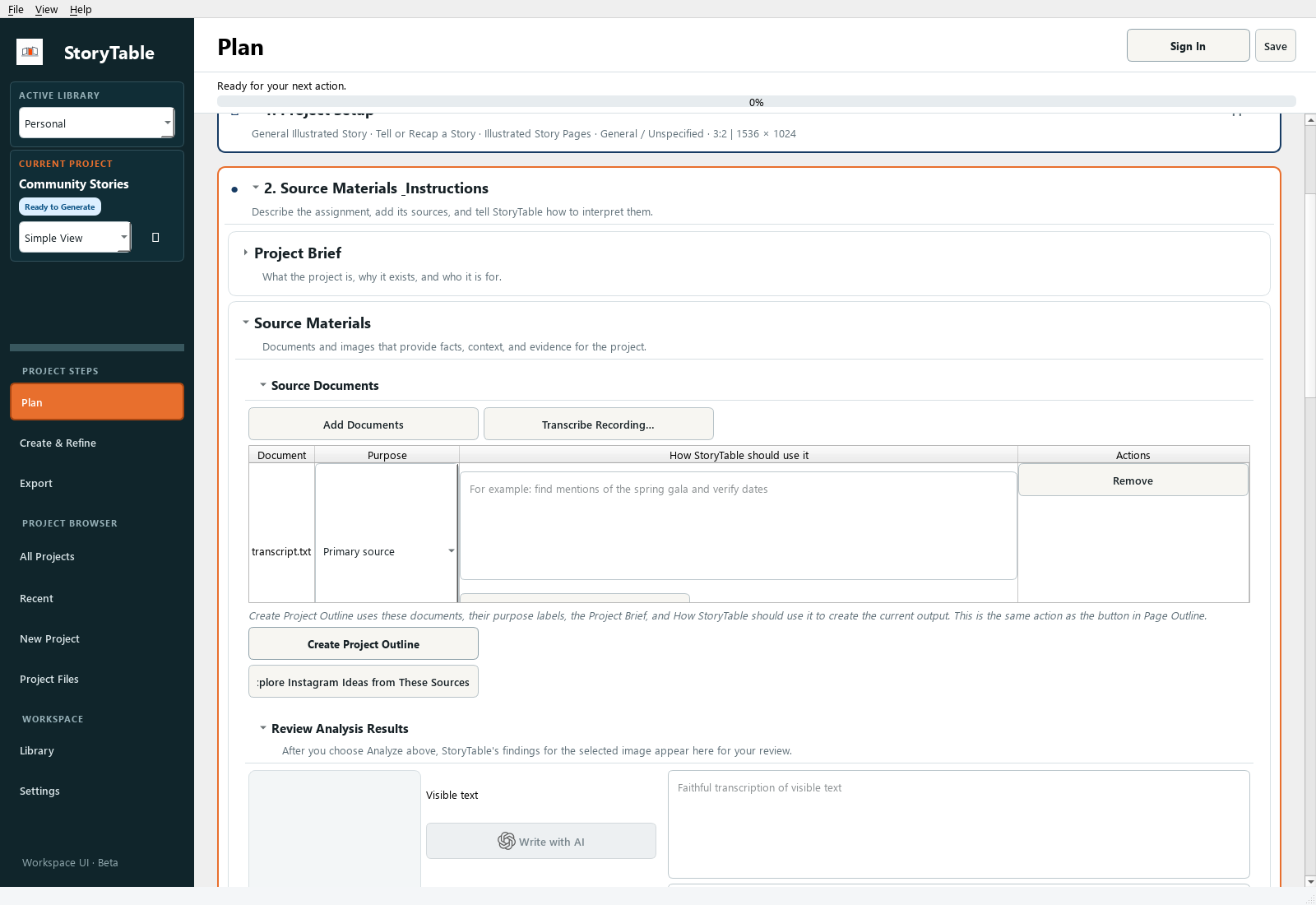
Give StoryTable the source material and instructions it needs before you ask it to plan or generate.
1. Open the source phase
Open your project, choose Plan, and expand Source Materials & Instructions. Open Source Materials and Source Documents.
2. Add a document or recording
Choose Add Documents to select a supported local file. For a recording, use Transcribe Recording… and review the resulting text. Start with one clear source rather than several overlapping versions.
3. Assign a purpose
Select the document and check its purpose. Use Primary source for the material the project should be based on; identify supporting material appropriately.
4. Explain how to use it
Fill in How StoryTable should use it. For example: ‘Use the interview as evidence. Keep names and dates unchanged. Organize the presentation around the three main themes.’
5. Create and review the outline
Choose Create Project Outline when the material and instructions are ready. Read the outline against the original source and correct missing context or unsupported claims before moving on.
Check your result
The project contains the intended source, its role is clear, and the outline reflects what the source actually says.
Defining Audience and Purpose
An audience and a communication goal give every page a consistent reason to exist.
1. Choose the communication goal
In Plan → Project Setup, choose a goal such as Teach or Explain, Guide a Process, Tell or Recap a Story, or Promote or Persuade. Use More Goals… for other choices.
2. Choose a useful starting preset
Use Browse All Presets… if the visible choices do not fit. Apply a preset that is close to the task, then review the choices it brings into the project.
3. Write a concrete brief
In Source Materials & Instructions, describe who will read or watch the work, what they already know, and what they should understand or do afterward. Example: ‘Introduce this process to new volunteers who have never used it.’
4. State the boundaries
Specify the desired emphasis and anything that must stay true: terminology, dates, evidence, tone, or topics to omit. Keep source facts distinct from creative presentation instructions.
5. Check the planned pages
Review the page outline. Ask whether the sequence answers the audience’s questions in the right order. Adjust the plan before generation.
Check your result
You can describe the intended audience and outcome in one sentence, and each planned page supports that outcome.
Planning Before You Generate
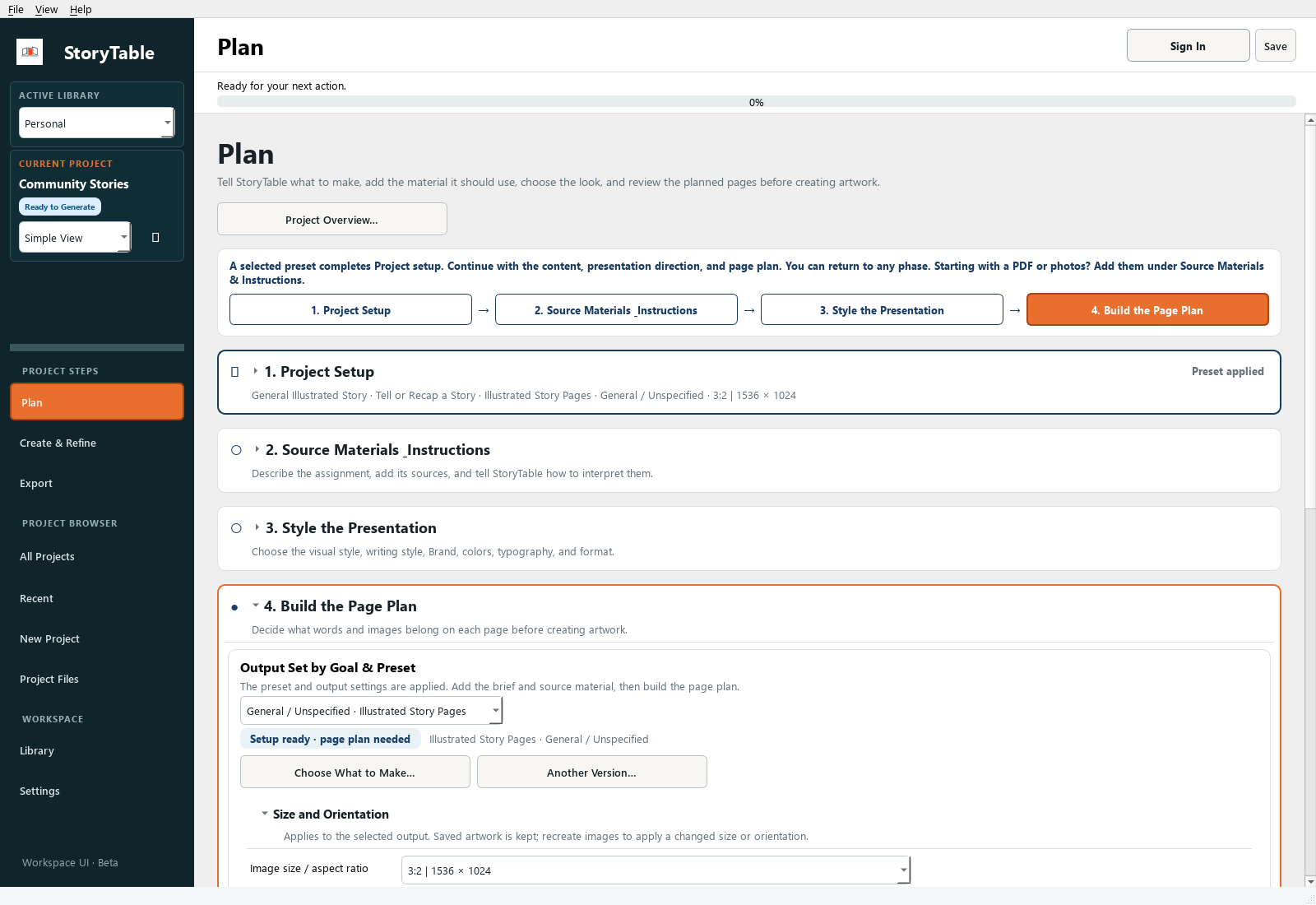
Use the page plan to resolve structure, scope, and emphasis while changes are still easy.
1. Finish the inputs
In Plan, review Project Setup, Source Materials & Instructions, and Style the Presentation. Confirm the source, goal, writing style, and visual direction.
2. Choose the output
Open Build the Page Plan. Use Choose What to Make… to review the deliverable and channel. Check Size and Orientation for the intended viewing context.
3. Inspect the page outline
Expand Page Outline. Read the sequence from beginning to end. Look for missing setup, repeated ideas, abrupt transitions, and pages with too much to communicate.
4. Revise the plan
Edit the page instructions so each page has a clear job. Keep factual requirements explicit and separate them from optional visual suggestions.
5. Generate only after review
Move to Create & Refine once the plan is coherent. If you change the audience or output substantially, return to the plan and review it again.
Check your result
The page sequence tells the intended story without relying on generated artwork to repair a weak structure.
Generating Your First Draft
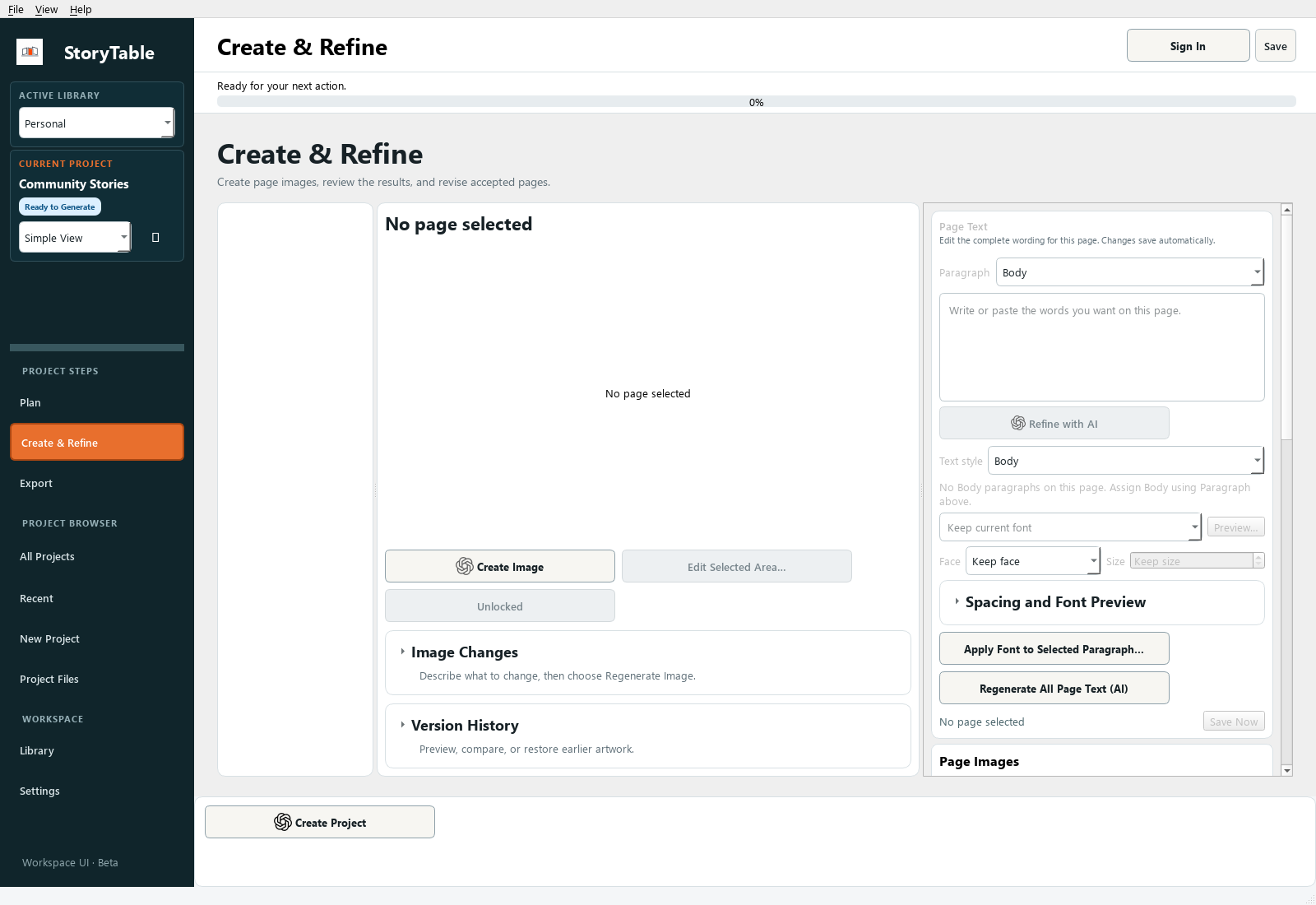
Turn a reviewed plan into a draft, then inspect the result page by page.
1. Review the plan first
Confirm the source instructions, output, visual style, writing style, and page outline in Plan. Generation uses those decisions.
2. Open Create & Refine
Choose Create & Refine in the left navigation. Use Create Project when the project is ready, and review any generation choices or confirmations shown by the app.
3. Inspect every page
Select pages in the page list. Read the text and inspect the artwork together. Check facts, names, legibility, composition, and whether each page fulfills its planned purpose.
4. Adjust selectively
Use the selected page’s text, art direction, and layout controls to address specific problems. Use Create Image or the available regeneration control for the intended page or selected set.
5. Save and preview
Use Save Now after your review. Open Preview… to assess the sequence before moving to Export. A first draft should be reviewed before it is shared.
Check your result
Every generated page has been reviewed, and remaining changes are specific enough to handle one page at a time.
Revising a Single Page
Make a focused correction while preserving the parts of the project that already work.
1. Select the target page
In Create & Refine, select the page you want to change. Confirm its preview and text before editing.
2. Choose the kind of change
For text, edit the selected page’s text or use Refine with AI with a precise instruction. For visuals, review Art Direction and describe the change you want in Image Changes.
3. Control the scope
Check which pages are selected before running an operation. Checked pages define Create Selected Images, and locked pages are skipped. Avoid project-wide commands when your intent is a single-page revision.
4. Refine the visual
Use the relevant image action for the selected page. Edit Selected Area… is available for focused image changes when an image is present. Compare the new result with the previous version.
5. Review and save
Check the revised page in sequence. Use Version History when you need to inspect earlier results, and Save Now when you are satisfied.
Check your result
The target page is improved, and the surrounding pages still provide the intended context and continuity.
Reusing a Project for a New Output
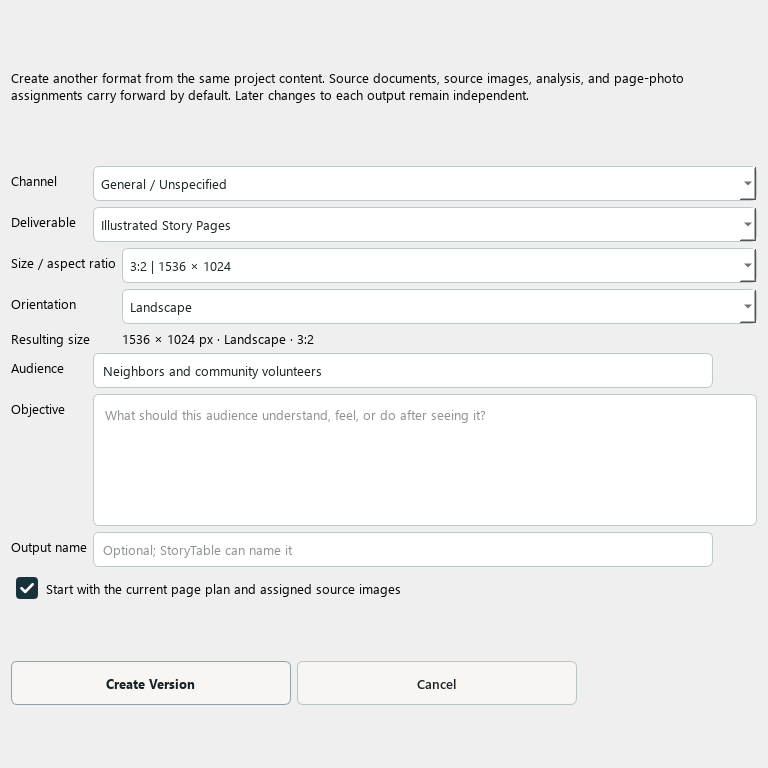
Create a second output from a project’s existing source and planning work.
1. Open the original project
Review its sources and brief before reusing them. Correct any source problems that would otherwise carry into the new version.
2. Create another version
In Plan → Build the Page Plan, choose Another Version…. The Create Another Version dialog lets you define the new output.
3. Define the new audience and format
Choose the channel, deliverable, dimensions, audience, objective, and name that fit the new use. A presentation and a social sequence usually need different pacing and text density.
4. Review what carries forward
The new version can carry source documents, images, analysis, and page-photo assignments. Review those inherited inputs rather than assuming every original page should be copied unchanged.
5. Plan and create the new output
Review the new version’s page outline, then use Create & Refine and Export. The outputs can be refined independently after creation.
Check your result
You have a clearly named new version with its own output choices and a plan suited to its audience.
Exporting and Handoff
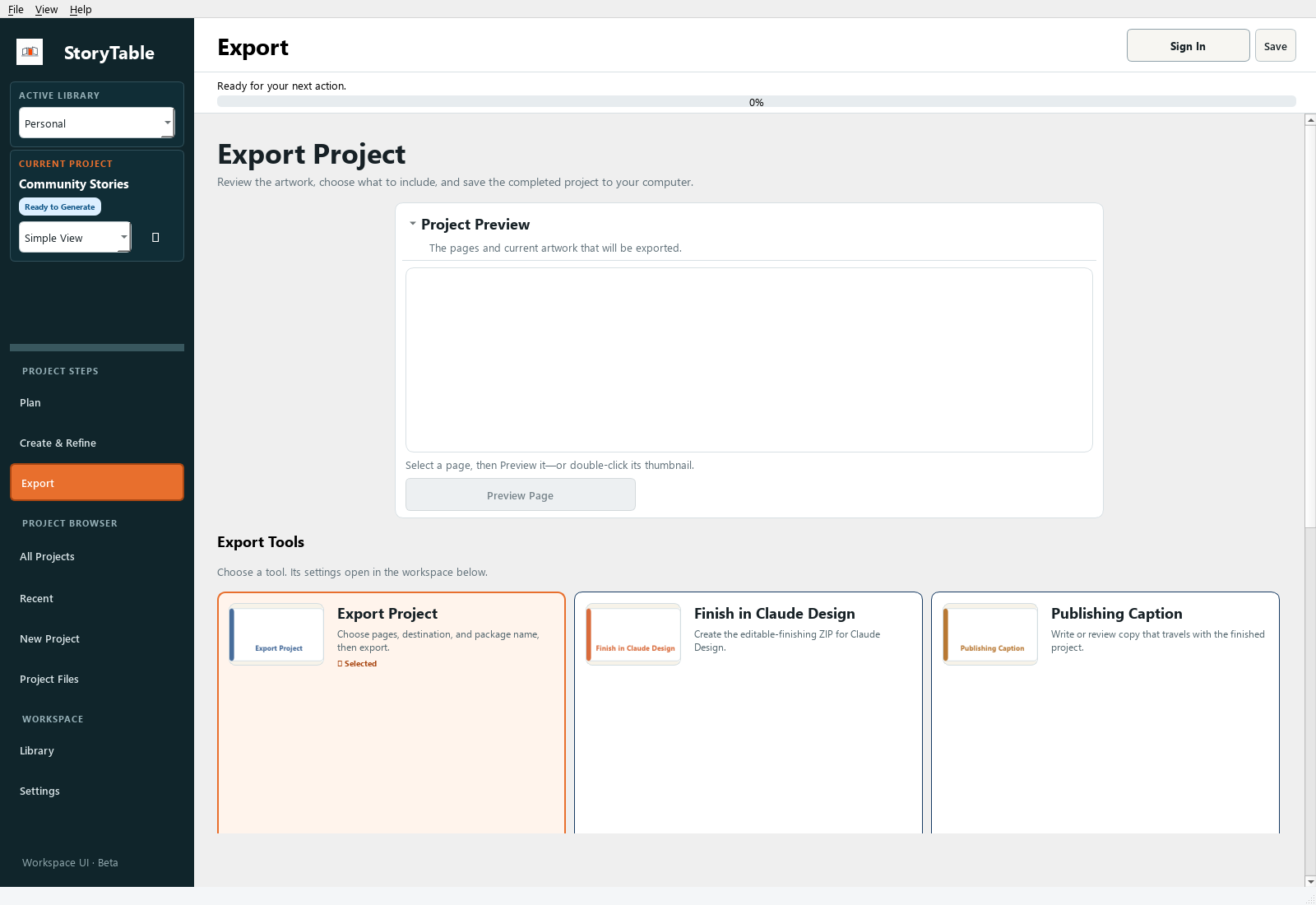
Create a reviewable package and check it before handing the project to someone else.
1. Preview the project
Open Export and use Project Preview or Preview Page. Check page order, text, artwork, and any material that should not be included.
2. Choose the export tool
Use Export Project for the standard handoff. Other Export Tools include Publishing Caption, Export Project Assets, and Finish in Claude Design when those fit your workflow.
3. Set scope and destination
In Export Settings, review Export scope, Save location, and Package name. Use Browse to choose a destination you can easily locate.
4. Export
Choose Export Project and wait for completion. The available package can include a PowerPoint reference, PDF, images, captions, CSV, ZIP, and an offline HTML preview, depending on the output and export choices.
5. Inspect the delivered files
Open the exported files outside StoryTable. Confirm images and text are readable and the expected pages are included. Share the relevant finished files with a short note explaining what the recipient should review.
Check your result
The package opens successfully outside the app and contains the intended final scope.
Preserving or Reimagining Your Images
Decide deliberately whether a page should preserve a supplied image or use it as material for a new visual.
1. Select a page
In Create & Refine, choose the page that needs the image. Read its purpose and art direction first.
2. Add or choose an image
Use Add Images to This Page… for a local image, or Choose Project Images… to use material already available to the project.
3. Choose the intended treatment
Review the image-use options shown for the selected image. When the original photograph itself is the evidence, keep the original. When you want a new visual interpretation, explain the desired transformation and which identity or factual details must remain.
4. Generate only when needed
Creating a new image is a separate action from selecting an original. Review the chosen image treatment and page scope before running image generation.
5. Compare with the source
Check the finished page against the original. Look for altered details, unexpected cropping, or changes that undermine the page’s purpose. Keep the source available for comparison.
Check your result
The finished page makes intentional use of the source image, and any reimagining has been reviewed for accuracy.
Creating and Using Visual Styles
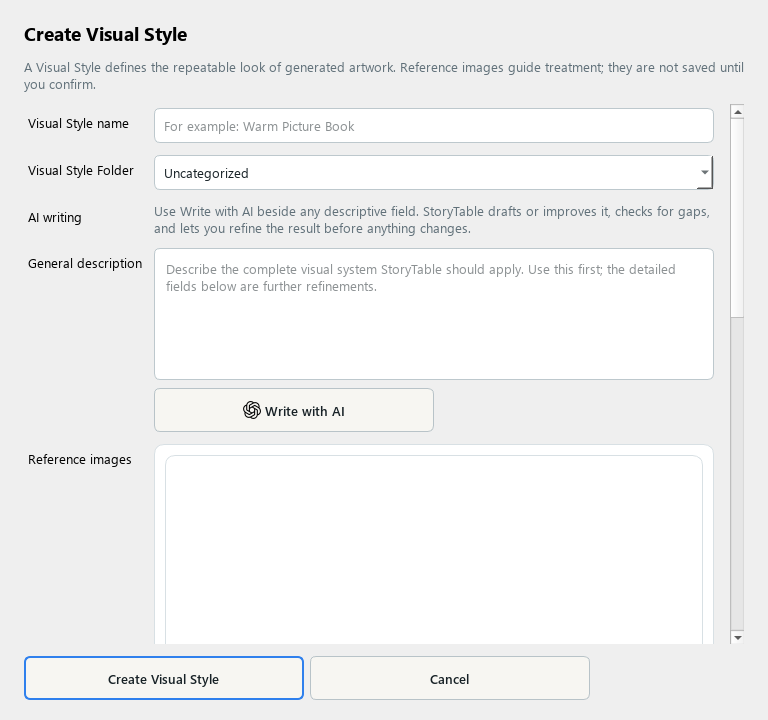
A Visual Style describes how images look and can be reused across projects.
1. Open the editor
Open Library, select Visual Style, and create a new item. Give it a descriptive name you will recognize later.
2. Describe the treatment
In General description, describe medium, line quality, texture, palette, lighting, and framing. Focus on the visual treatment rather than the identity of a specific subject.
3. Add references if useful
Choose Add Reference Images for examples you have permission to use. Explain what to learn from them, then use Analyze Selected Images if you want assistance. Review the suggested description before saving.
4. Refine and save
Review Advanced Settings if needed, then choose Create Visual Style. Keep the description specific enough to produce a coherent family of images.
5. Use it in a project
In Plan → Style the Presentation, select the saved Visual Style. Generate a small sample and review how well the treatment carries across different subjects.
Check your result
The saved style describes a reusable visual language and is selected in the intended project.
Creating and Using Character Visual Styles
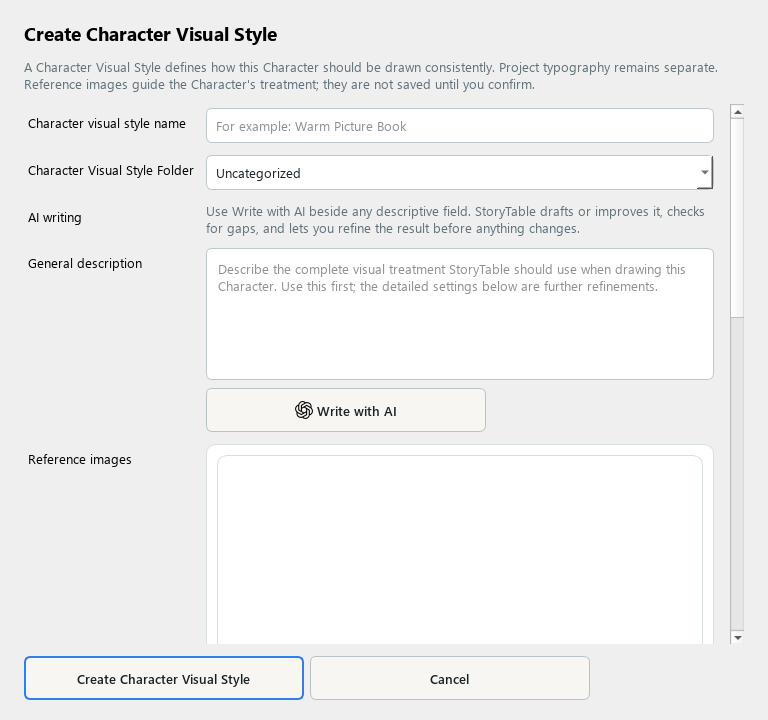
A Character Visual Style controls a character’s rendering treatment independently of the project’s overall visual style.
1. Create the style
In Library, choose Character Visual Style and create a new item. Use a name that describes the treatment.
2. Describe the character rendering
Specify proportions, shape language, line, texture, shading, and color treatment in General description. Keep the description separate from the identity of one particular character.
3. Use references carefully
Add reference images and describe the visual qualities to learn. If you analyze the images, review the resulting instructions and remove unwanted subject-specific details.
4. Save the style
Choose Create Character Visual Style. Typography belongs to the project’s presentation choices, so keep this style focused on the character rendering.
5. Apply it to a character
Create or edit a Character, select this character visual style, and review it in a project. Check that the character remains recognizable in the project’s surrounding visual world.
Check your result
The character treatment is reusable and does not accidentally redefine the character’s identity.
Creating and Using Characters
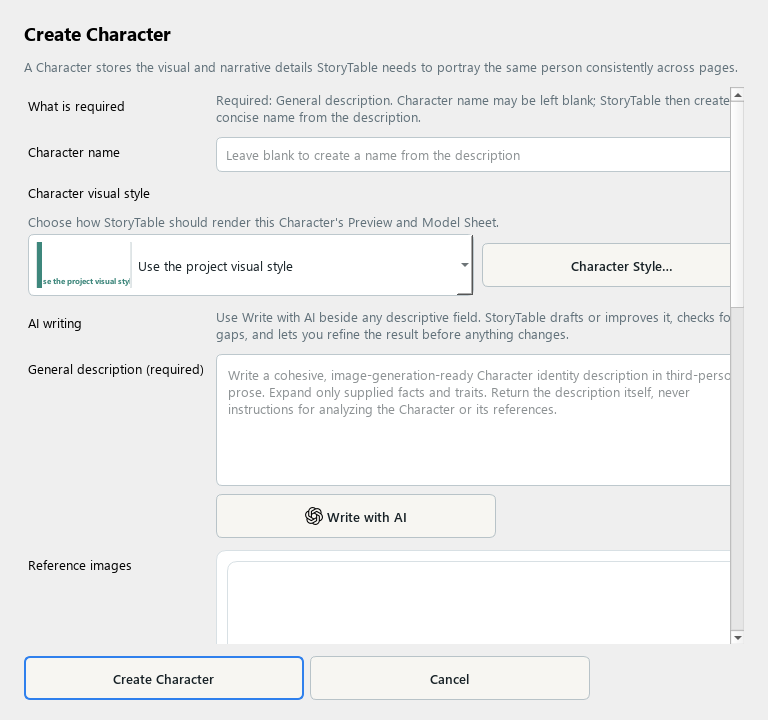
A Character holds the identity and appearance details needed for a recurring figure.
1. Create a Character
In Library, choose Character and create a new item. Add a name if useful and a clear General description.
2. Define distinguishing details
Describe the person or figure consistently: appearance, clothing, role, and other traits that should carry across pages. Avoid contradictory descriptions.
3. Choose a rendering style
Use the Character visual style selector or Character Style… to choose the character’s treatment.
4. Add reference images
Add clear references when available. Review any analysis before saving, especially identifying details and clothing that must remain consistent.
5. Save and review in context
Choose Create Character and use the saved character in the relevant project. Review multiple pages for consistency; a saved description still requires visual checking.
Check your result
The character has a clear identity, useful references, and a rendering style that fits the project.
Creating and Using Presets
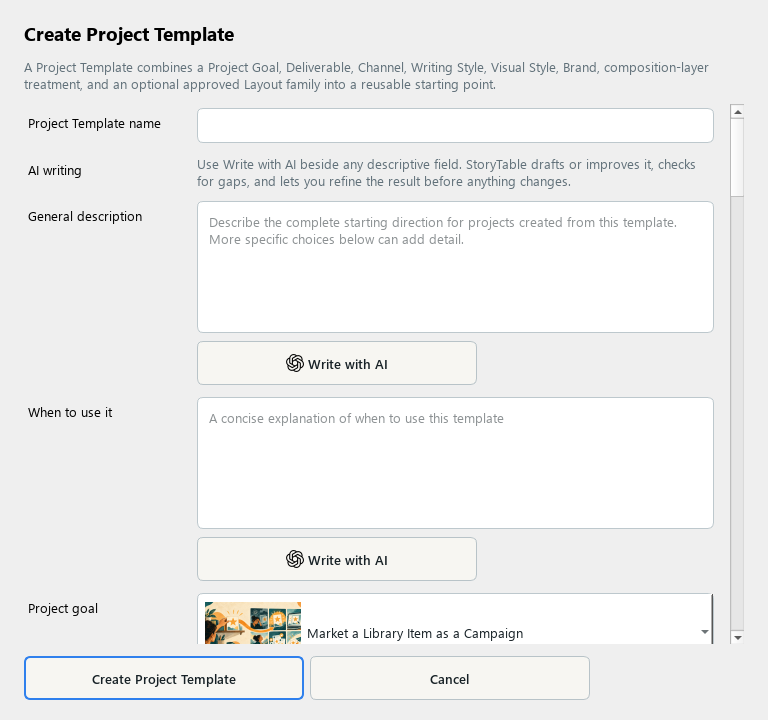
Presets bundle recurring project choices so you can start a familiar kind of work consistently. The editor may label the underlying item Project Template.
1. Start from a useful setup
In Plan → Project Setup, apply a close preset and adjust the project choices. Use Save as New Preset to capture a setup you want to reuse, or create a Project Template in Library.
2. Describe its purpose
Give the template a recognizable name, a General description, and a clear When to use it explanation.
3. Set the reusable choices
Choose the project goal, deliverable, channel, usual audience, writing style, visual style, and brand as appropriate. Leave genuinely variable choices flexible.
4. Review routing and layout rules
Review Text Routing and Density, caption and evidence rules, and layout preferences. Keep limits realistic for the chosen output and avoid conflicting instructions.
5. Save and test
Save the item, then use Browse All Presets… in a project and Apply Preset. Review the resulting choices before creating a page plan.
Check your result
The preset saves repeated setup work while leaving project-specific source material and intent clear.
Creating and Using Project Goals
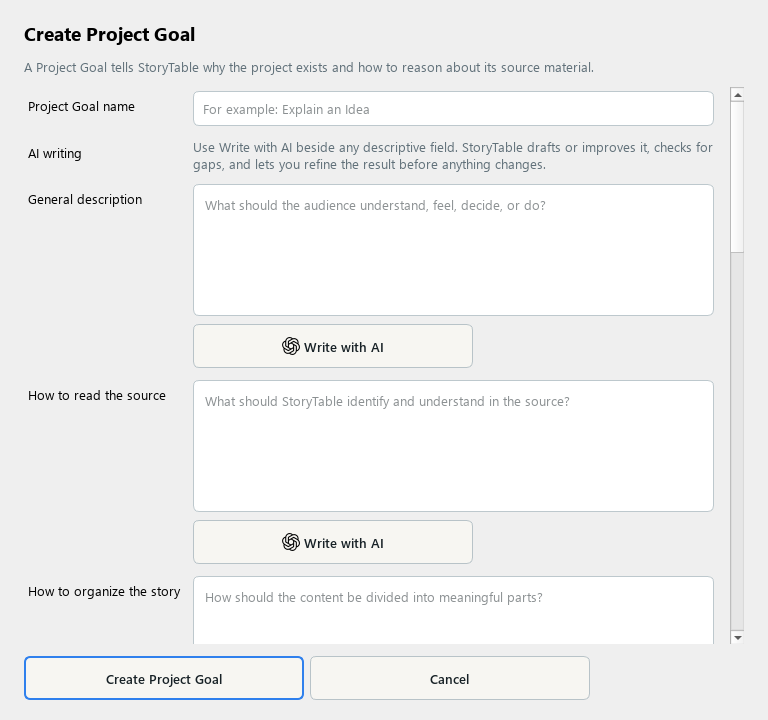
A Project Goal describes the communication task that should shape the structure of the work.
1. Create a goal
In Library, choose Project Goal and create a new item. Name the communication task clearly.
2. Explain the purpose
Add a General description and audience guidance. Describe what the finished work should help the audience understand, feel, or do.
3. Guide source interpretation
Fill in How to read the source and How to organize the story. Specify required content, what must stay true, and what to avoid.
4. Add useful instructions
Review writing and image instructions. Choose a usual writing style or Instruction Assistant where appropriate, without using them to override source accuracy.
5. Save and apply
Save the goal and select it during Project Setup. Review whether the generated outline follows the intended communication structure.
Check your result
The goal explains the communication task without hard-coding one project’s facts or one output format.
Creating and Using Deliverables
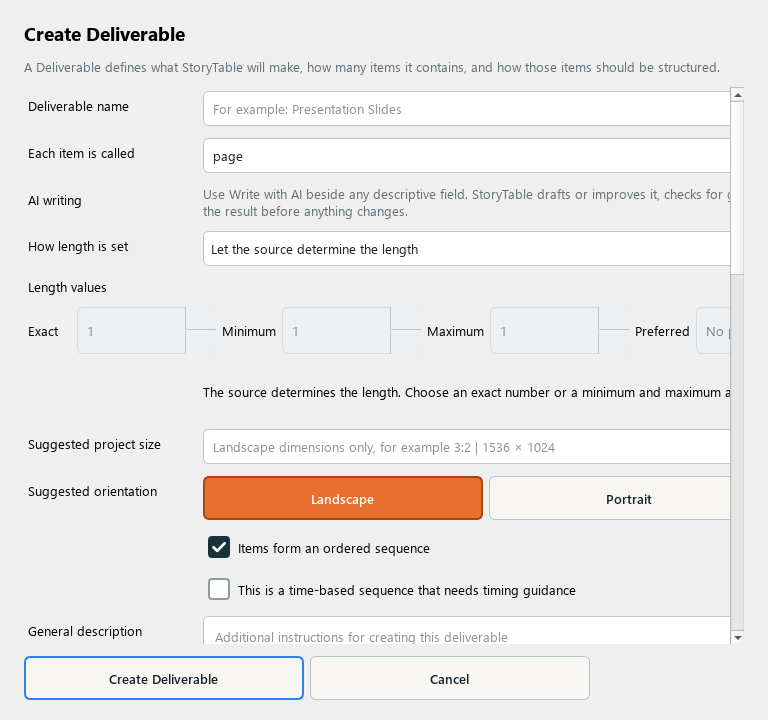
A Deliverable defines the form of the finished work and how its items fit together.
1. Create a deliverable
In Library, choose Deliverable and create a new item. Name the output and specify what each item is called, such as a page, slide, or panel.
2. Set length rules
Choose how length is set and enter the relevant exact, minimum, maximum, or preferred count. Use limits that fit the amount of source material.
3. Define the format
Review suggested project size and orientation. Describe visible text capacity, hierarchy, and how items work together.
4. Describe supporting requirements
Add required supporting details and image instructions. Review whether the output is ordered or time-based so its structure matches the intended use.
5. Save and use
Save the deliverable and choose it for a project or another version. Review the page plan for pacing and density before generation.
Check your result
The deliverable defines a practical form with clear item counts, dimensions, and composition expectations.
Creating and Using Channels
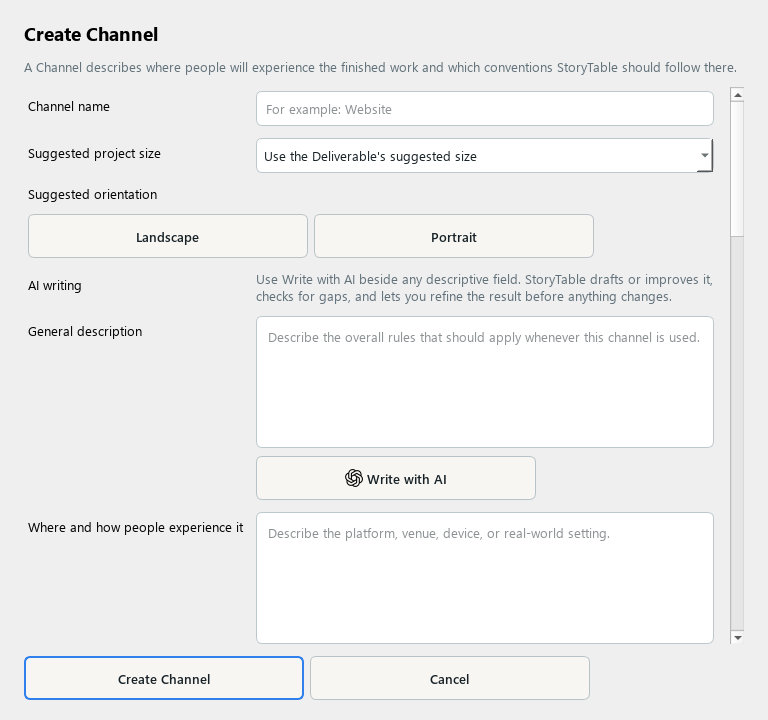
A Channel records the viewing and distribution context for an output.
1. Create a channel
In Library, choose Channel and create a new item. Name the destination or viewing context.
2. Describe the experience
Explain where and how people encounter the work and what belongs in the finished output. Describe how the audience uses it.
3. Set presentation constraints
Review suggested size and orientation, safe areas and layout, and supporting material. Write down constraints that matter in the actual viewing context.
4. Include access and distribution needs
Add accessibility, discovery, distribution, and attention guidance. Keep requirements specific and avoid assuming every platform uses the same format.
5. Save and apply
Save the channel and select it for the intended project output. Preview the result at an appropriate size and check readability before exporting.
Check your result
The selected channel helps the work fit its destination and the audience’s viewing conditions.
Creating and Using Writing Styles
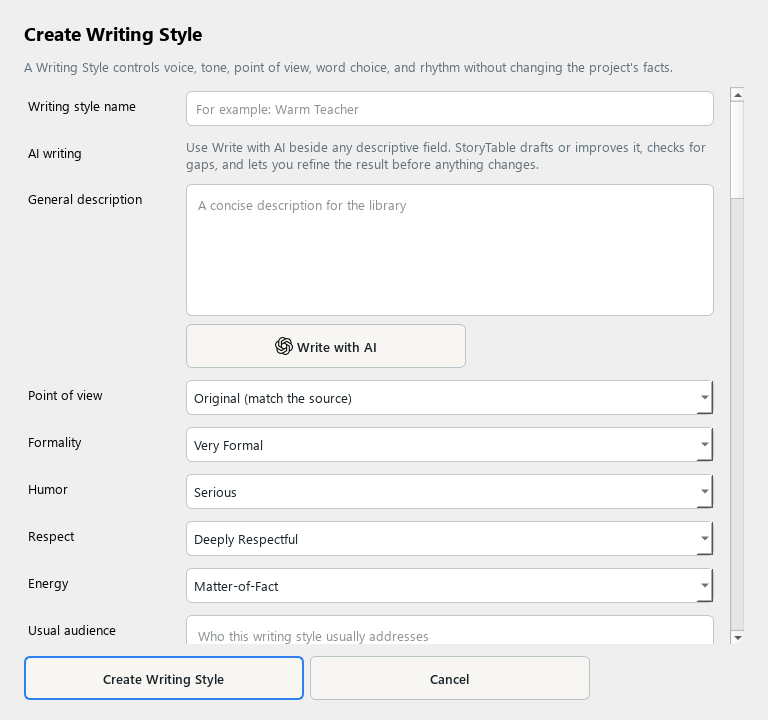
A Writing Style gives generated text a consistent voice while preserving the source’s meaning.
1. Create a style
In Library, choose Writing Style and create a new item. Add a name and a concise description.
2. Set voice and tone
Choose point of view and describe formality, humor, respect, energy, audience, and personality. Give guidance that a writer could actually follow.
3. Specify language habits
Describe vocabulary, sentence rhythm, inclusive language, preferred phrases, and what to avoid. Add an approved example that demonstrates the intended voice.
4. Learn from examples if useful
Provide sample text, local files, or article URLs in Learn from examples. Analyze Writing produces editable suggestions; review them before saving.
5. Use and review
Save the style and select it in Plan → Style the Presentation. Check generated text for both voice and factual accuracy.
Check your result
The saved style produces recognizable writing choices without changing the facts or purpose of the source.
Creating and Using Brands
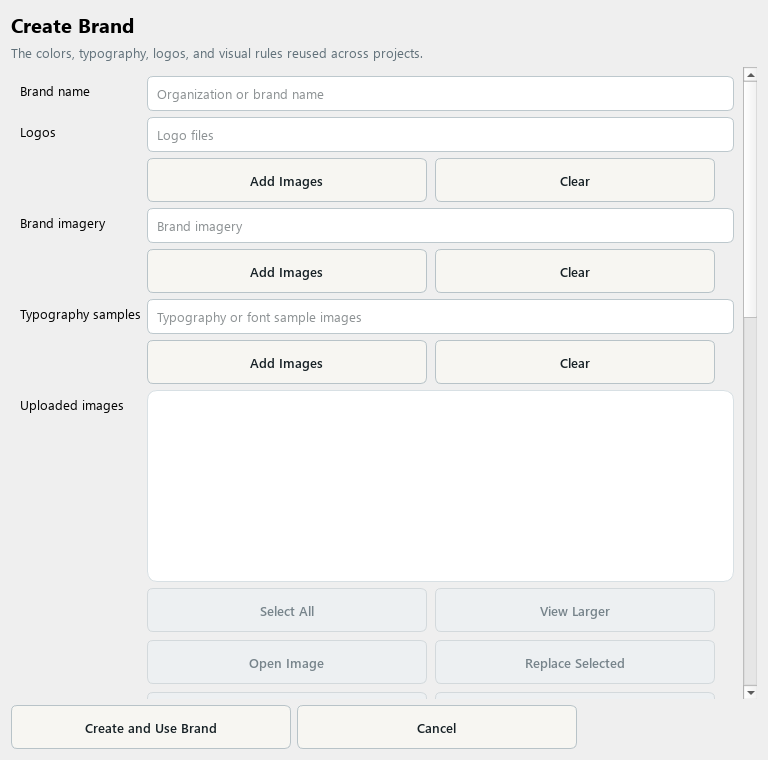
A Brand collects the identity rules and assets reused across projects.
1. Create a Brand
Open Library, choose Brand, and create a new item. Enter the organization or brand name.
2. Add identity assets
Add logo files and relevant brand imagery. Keep the intended logo treatment distinct from general visual inspiration.
3. Set color and typography
Review the palette and typography controls. Add font-sample images when useful and specify the actual type choices and visual rules you want to reuse.
4. Review before saving
Check the selected files, color choices, and written instructions. Remove examples that contradict the intended identity.
5. Apply and inspect
Save the Brand and choose it for a project or preset. Review exported pages for logo placement, color consistency, and readable typography.
Check your result
The Brand contains the correct assets and clear rules, and the resulting output has been visually reviewed.
Creating and Using Page Layouts
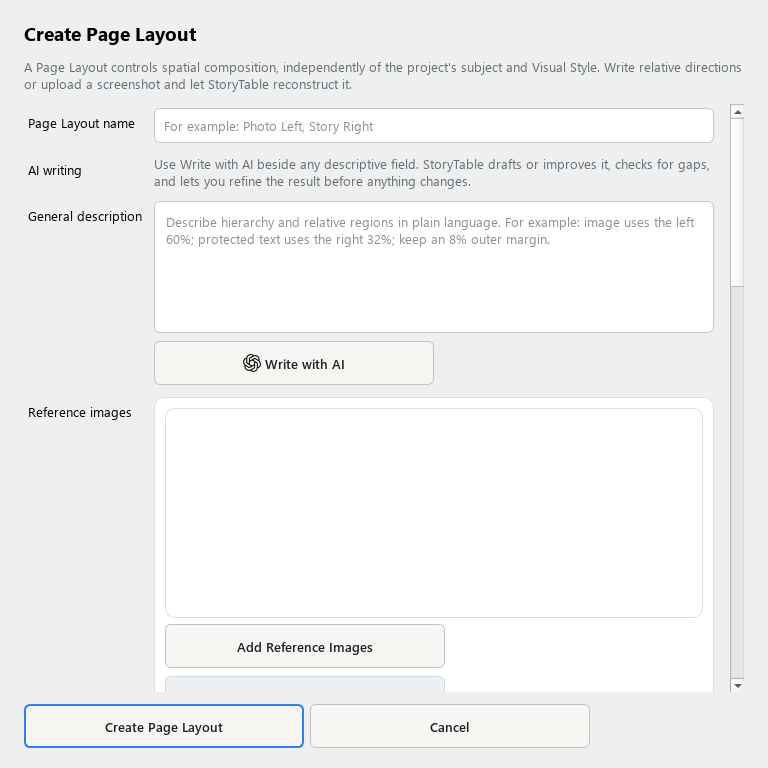
A Page Layout captures a reusable composition for a particular kind of page.
1. Create a layout
In Library, choose Page Layout and create a new item. Name the composition and describe its purpose.
2. Describe its role
Set the primary page role, what the layout is best for, outputs and channels, and the intended composition. Explain where the main image and text should sit.
3. Use references
Add reference images if you have examples. Use Create Layout from Selected Images when useful, then review the detected regions rather than accepting them blindly.
4. Check orientations
Review the landscape, portrait, and square arrangements that apply. Use Advanced Layout Controls where needed to refine the composition.
5. Save and test
Choose Create Page Layout and use it for a suitable page or template. Preview real content in the layout and check text fit, hierarchy, and safe spacing.
Check your result
The layout works with real content and has a clear role in the overall page sequence.
Creating and Using Instruction Assistants
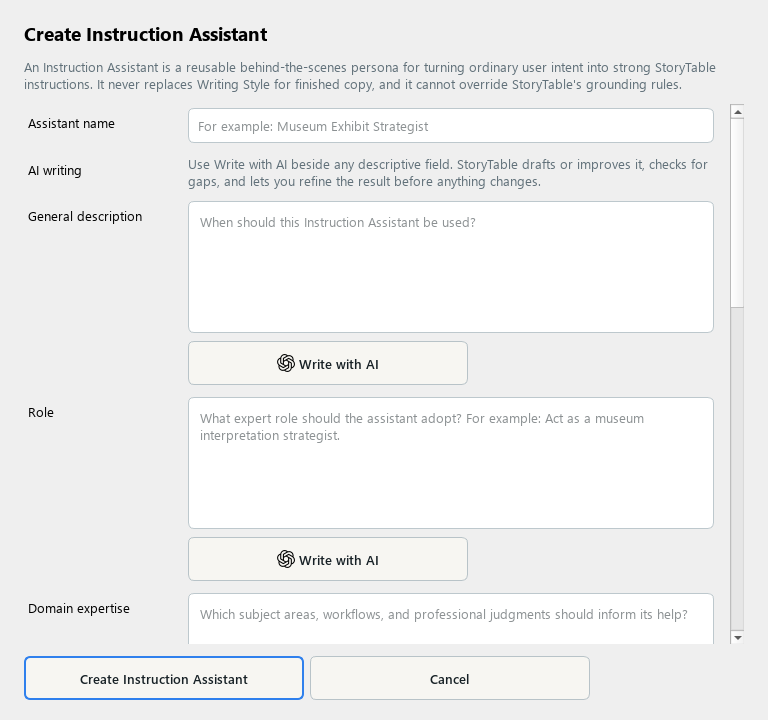
An Instruction Assistant provides a reusable specialist perspective for planning and critique.
1. Create an assistant
In Library, choose Instruction Assistant and create a new item. Give it a descriptive name and purpose.
2. Define the role
Describe its role and domain expertise. Use a specific perspective, such as a curriculum planner or a presentation editor.
3. Guide its behavior
Explain how it should interpret intent, draft instructions, critique work, and handle ambiguity. Tell it when to ask for clarification instead of inventing missing facts.
4. Keep responsibilities clear
The assistant does not replace a Writing Style or override source grounding. Keep voice rules in the writing style and factual requirements in the project’s source instructions.
5. Save and use
Save the assistant and select it where the project or goal offers an Instruction Assistant choice. Review its suggestions before applying them.
Check your result
The assistant’s role is specific, its limits are clear, and its advice supports the actual project intent.
Importing Items from the Library
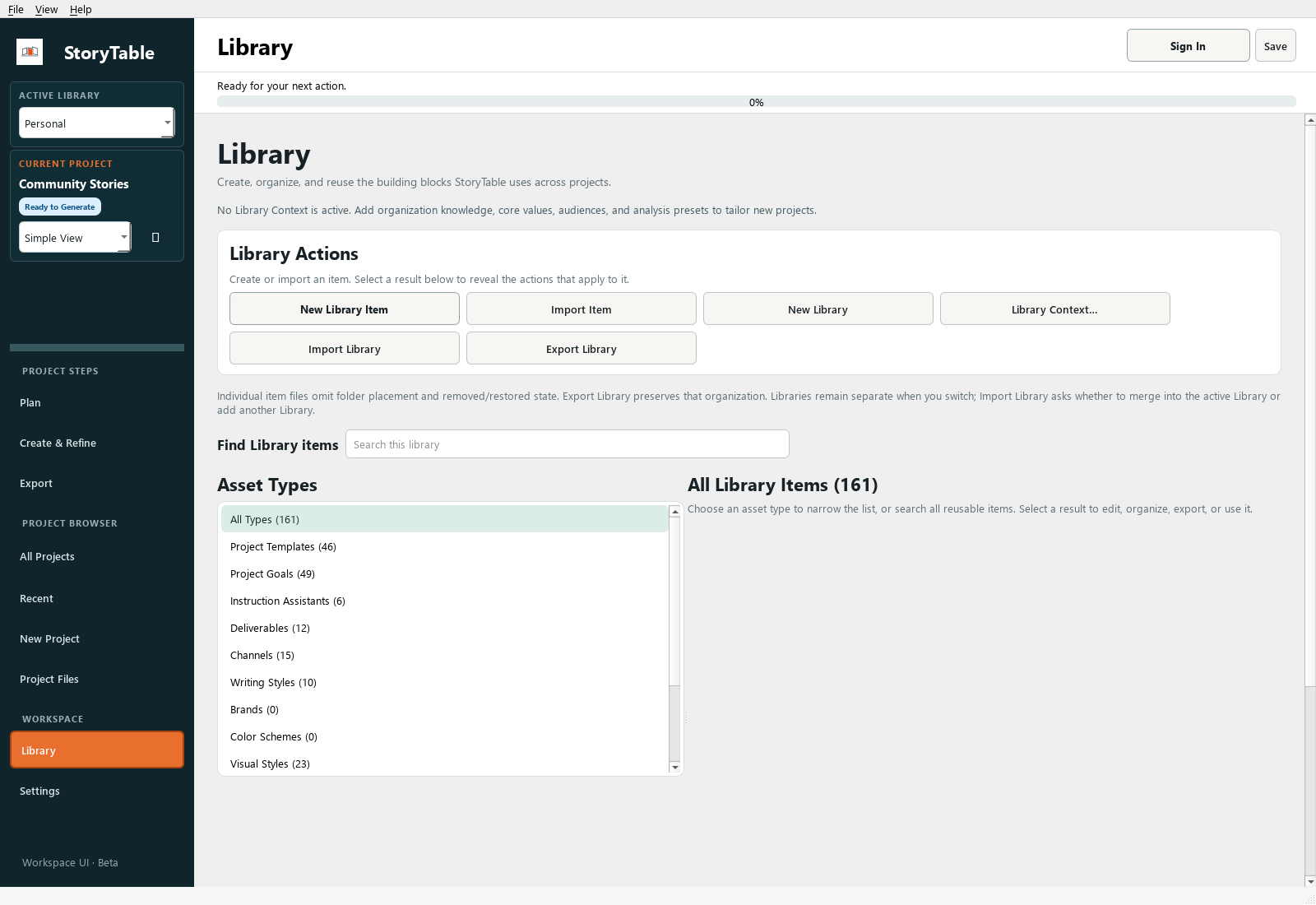
Bring a downloaded reusable asset into your local StoryTable Library.
1. Download the asset
Choose an item from the StoryTable website Library and download its ZIP. Extract the ZIP, then locate the included .storytable-asset file and README.
2. Open the app Library
In StoryTable, open Library and choose Import Item. Select the extracted .storytable-asset file in the file picker.
3. Select a supported file
Choose a .storytable-asset, .storytable-template, or .storytable-style file. A local Brand kit can use its kit.json file. Do not select an unrelated ZIP or rename a different file to one of these extensions.
4. Review the import
Follow the prompts, including any legacy asset-type choice. Check the imported item’s name, description, references, and settings in the library.
5. Use it in a project
Select the imported item in the relevant project setting or preset. Create a small sample and review the result before relying on it for a larger output.
Check your result
The imported item appears in the correct library category and can be selected in a project.