
Creating and Using Deliverables
Set the finished form: unit counts, aspect ratio, text capacity and structure rules.
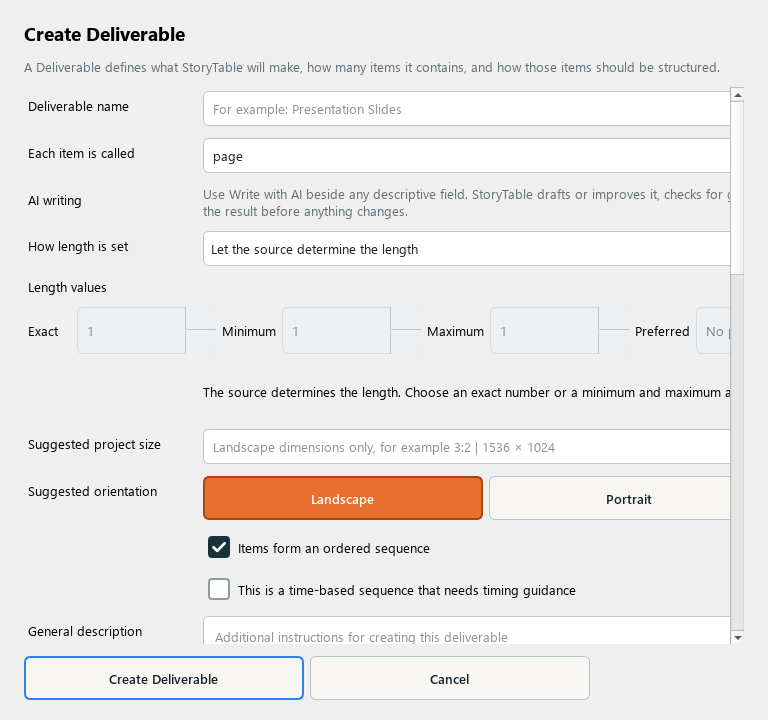
A Deliverable defines the form of the finished work and how its items fit together.
1. Create a deliverable
In Library, choose Deliverable and create a new item. Name the output and specify what each item is called, such as a page, slide, or panel.
2. Set length rules
Choose how length is set and enter the relevant exact, minimum, maximum, or preferred count. Use limits that fit the amount of source material.
3. Define the format
Review suggested project size and orientation. Describe visible text capacity, hierarchy, and how items work together.
4. Describe supporting requirements
Add required supporting details and image instructions. Review whether the output is ordered or time-based so its structure matches the intended use.
5. Save and use
Save the deliverable and choose it for a project or another version. Review the page plan for pacing and density before generation.
Check your result
The deliverable defines a practical form with clear item counts, dimensions, and composition expectations.