
Creating and Using Characters
Define a recurring figure that stays the same person from panel to panel.
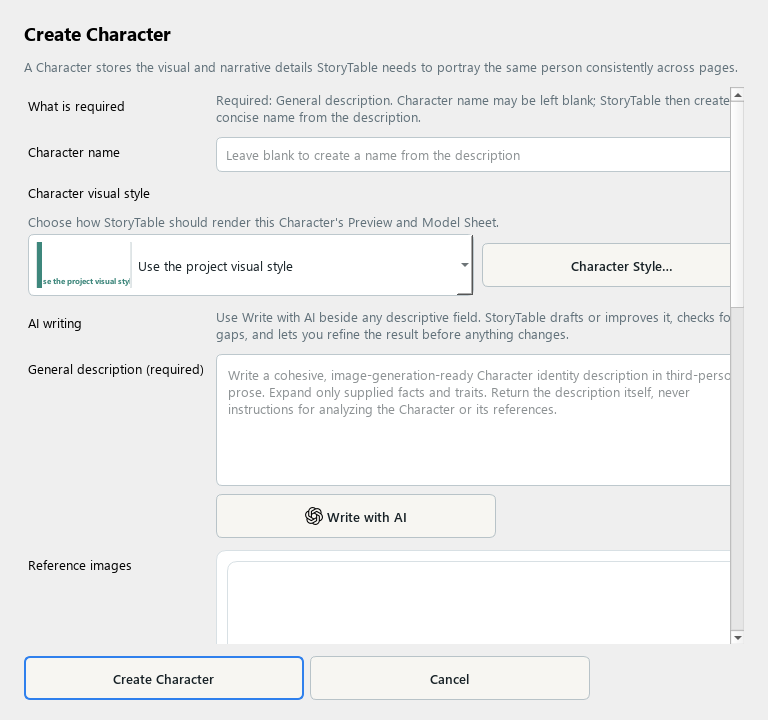
A Character holds the identity and appearance details needed for a recurring figure.
1. Create a Character
In Library, choose Character and create a new item. Add a name if useful and a clear General description.
2. Define distinguishing details
Describe the person or figure consistently: appearance, clothing, role, and other traits that should carry across pages. Avoid contradictory descriptions.
3. Choose a rendering style
Use the Character visual style selector or Character Style… to choose the character’s treatment.
4. Add reference images
Add clear references when available. Review any analysis before saving, especially identifying details and clothing that must remain consistent.
5. Save and review in context
Choose Create Character and use the saved character in the relevant project. Review multiple pages for consistency; a saved description still requires visual checking.
Check your result
The character has a clear identity, useful references, and a rendering style that fits the project.