
Creating and Using Project Goals
Define the communication act — teach, persuade, tell a story — that shapes how source material is structured.
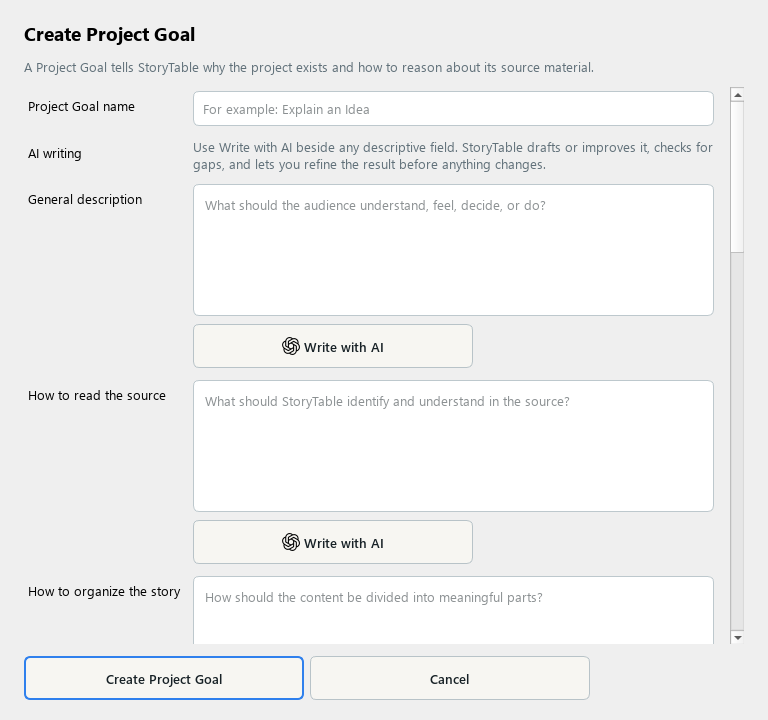
A Project Goal describes the communication task that should shape the structure of the work.
1. Create a goal
In Library, choose Project Goal and create a new item. Name the communication task clearly.
2. Explain the purpose
Add a General description and audience guidance. Describe what the finished work should help the audience understand, feel, or do.
3. Guide source interpretation
Fill in How to read the source and How to organize the story. Specify required content, what must stay true, and what to avoid.
4. Add useful instructions
Review writing and image instructions. Choose a usual writing style or Instruction Assistant where appropriate, without using them to override source accuracy.
5. Save and apply
Save the goal and select it during Project Setup. Review whether the generated outline follows the intended communication structure.
Check your result
The goal explains the communication task without hard-coding one project’s facts or one output format.