
Reusing a Project for a New Output
Start a second or third deliverable from the project you already built.
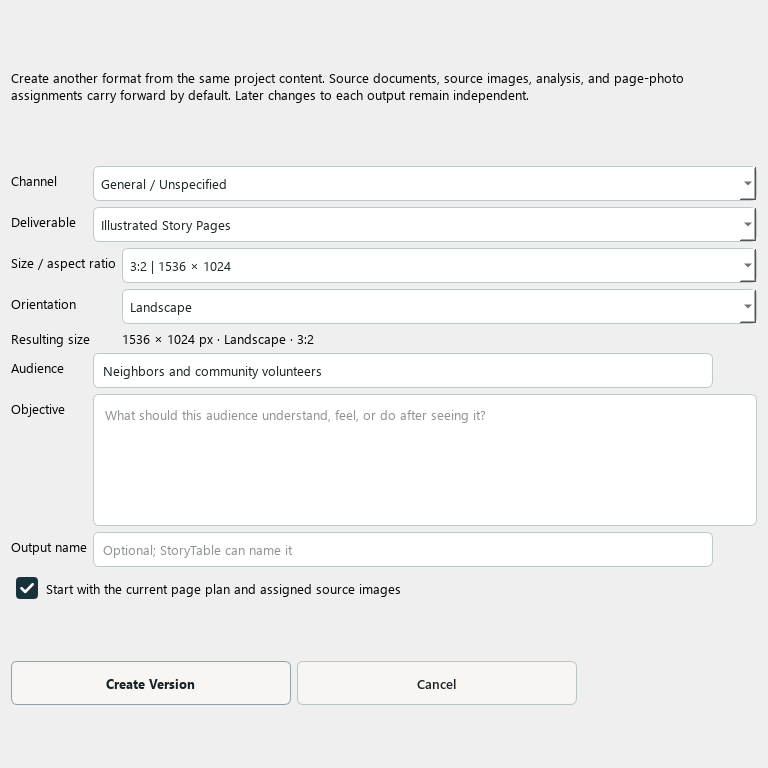
Create a second output from a project’s existing source and planning work.
1. Open the original project
Review its sources and brief before reusing them. Correct any source problems that would otherwise carry into the new version.
2. Create another version
In Plan → Build the Page Plan, choose Another Version…. The Create Another Version dialog lets you define the new output.
3. Define the new audience and format
Choose the channel, deliverable, dimensions, audience, objective, and name that fit the new use. A presentation and a social sequence usually need different pacing and text density.
4. Review what carries forward
The new version can carry source documents, images, analysis, and page-photo assignments. Review those inherited inputs rather than assuming every original page should be copied unchanged.
5. Plan and create the new output
Review the new version’s page outline, then use Create & Refine and Export. The outputs can be refined independently after creation.
Check your result
You have a clearly named new version with its own output choices and a plan suited to its audience.