
Creating and Using Instruction Assistants
Bring a specialist collaborator into planning and critique.
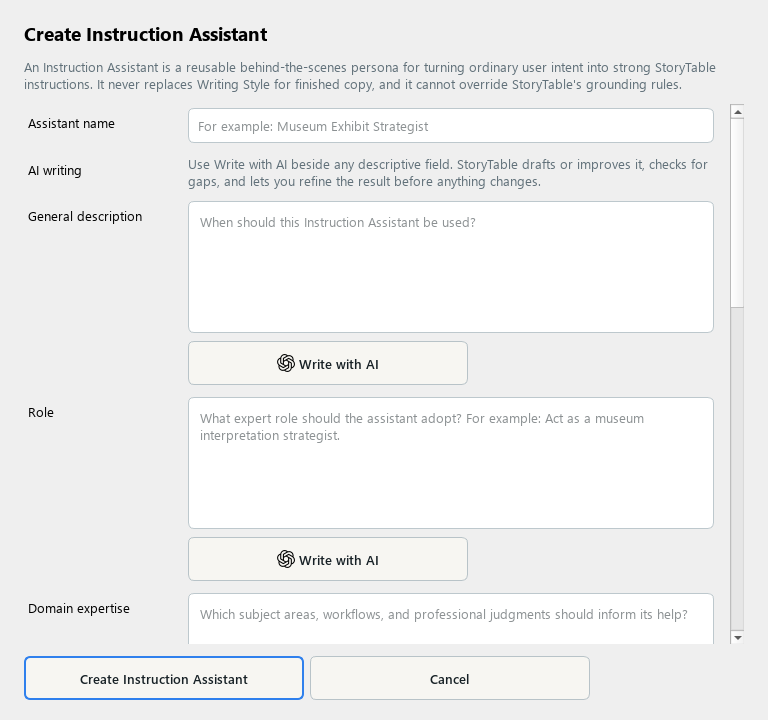
An Instruction Assistant provides a reusable specialist perspective for planning and critique.
1. Create an assistant
In Library, choose Instruction Assistant and create a new item. Give it a descriptive name and purpose.
2. Define the role
Describe its role and domain expertise. Use a specific perspective, such as a curriculum planner or a presentation editor.
3. Guide its behavior
Explain how it should interpret intent, draft instructions, critique work, and handle ambiguity. Tell it when to ask for clarification instead of inventing missing facts.
4. Keep responsibilities clear
The assistant does not replace a Writing Style or override source grounding. Keep voice rules in the writing style and factual requirements in the project’s source instructions.
5. Save and use
Save the assistant and select it where the project or goal offers an Instruction Assistant choice. Review its suggestions before applying them.
Check your result
The assistant’s role is specific, its limits are clear, and its advice supports the actual project intent.