
Creating and Using Writing Styles
Set tone, point of view, formality and cadence across every word generated in a project.
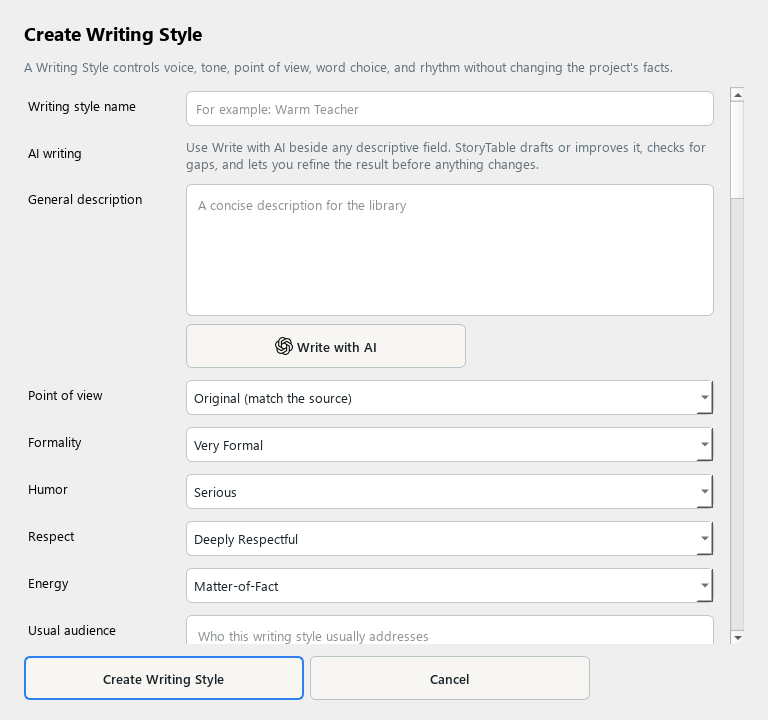
A Writing Style gives generated text a consistent voice while preserving the source’s meaning.
1. Create a style
In Library, choose Writing Style and create a new item. Add a name and a concise description.
2. Set voice and tone
Choose point of view and describe formality, humor, respect, energy, audience, and personality. Give guidance that a writer could actually follow.
3. Specify language habits
Describe vocabulary, sentence rhythm, inclusive language, preferred phrases, and what to avoid. Add an approved example that demonstrates the intended voice.
4. Learn from examples if useful
Provide sample text, local files, or article URLs in Learn from examples. Analyze Writing produces editable suggestions; review them before saving.
5. Use and review
Save the style and select it in Plan → Style the Presentation. Check generated text for both voice and factual accuracy.
Check your result
The saved style produces recognizable writing choices without changing the facts or purpose of the source.