
Getting Started
Install StoryTable and create your first project
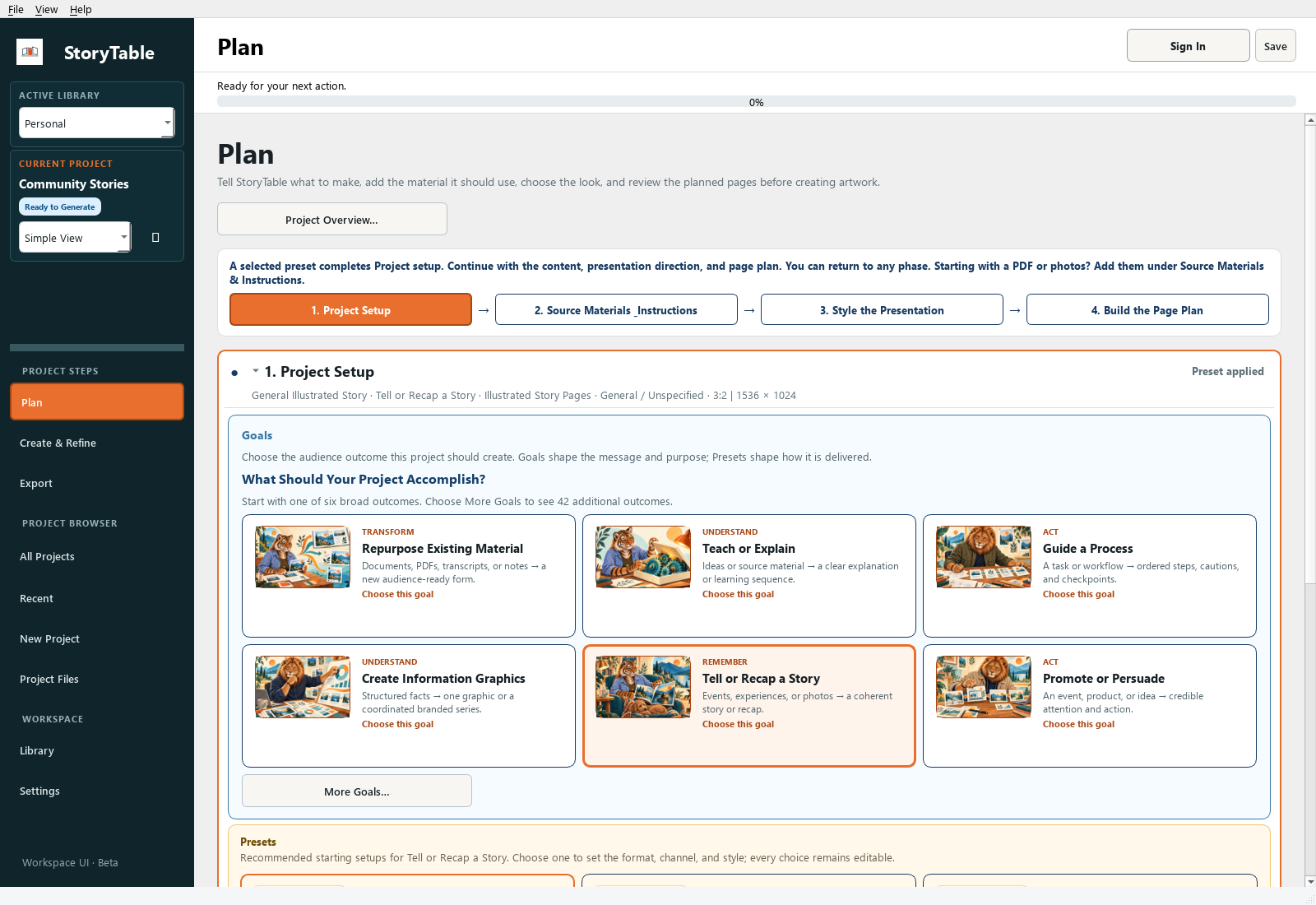
Build a small first project so you can learn the full workflow: Plan, Create & Refine, then Export.
1. Install and sign in
Use the Windows or Mac download in your beta access email, install StoryTable, and sign in with the password you set for your account.
2. Create a project
Create a new project and choose a name and a save location you can find again. Start with a short source document and a manageable output, such as a few presentation pages.
3. Set up the project
In Plan, open Project Setup. Choose the goal that matches your task, then apply a suitable preset. A preset gives you a starting combination of choices; review it before generating.
4. Add your material
Open Source Materials & Instructions. Add your source document and explain what the finished work should accomplish. Check that the right document is marked as the primary source.
5. Review the page plan
Choose your visual and writing styles in Style the Presentation. In Build the Page Plan, review the output and page outline. Correct the sequence and instructions before creating pages.
6. Create, review, export
Move to Create & Refine. Create the project, inspect each page, and make targeted revisions. In Export, preview the result, choose a save location and package name, and export the project.
Check your result
You should have a saved project, a reviewed page sequence, and an export package you can open outside StoryTable.